
Mostbetomad.com is not officially affiliated with Mostbet. This is an independent information platform.

Skip to content

Mostbet operator

Mostbet Android APK: installation and safe download

The official Mostbet app is not available on Google Play Store in Central Asia — Android users download the APK file manually and install it. This page covers the safe source, phone settings, installation steps, and how to detect fake files.

Mostbet Android APK install — not available on Play Store

In short

  • The Mostbet APK is only available from the official site — not on Play Store.
  • Phone settings must allow "install from unknown sources".
  • Fake APK files are the main risk — always verify the source before downloading.

Why is Mostbet not on Play Store?

Google Play Store restricts gambling apps in Central Asia and CIS regions. Mostbet is officially distributed via Play Store in some other regions (parts of Western Europe), but for Uzbekistan users the app is only available as an APK from the official site. This restriction also applies to other gambling operators and stems from Google's policy — not from a Mostbet shortcoming.
Where do I download the Mostbet APK from?

Only from the Mostbet official domain (mostbet-uz.com or the current mirror — always check the URL). Third-party download sites (apkpure.com, apkmirror.com, ozbekapk.uz and others) are unsafe. They may alter the file and inject malware. Don't trust Telegram channels or forum links either. Only access the Mostbet site via your browser and click "Mobile app" or "Download". About app availability: Mostbet app (Android and iOS).

Downloading the APK on an Android phone — official site only
Download only through the browser from the official site.

What settings does the Mostbet APK need?

Before installation, Android must allow "install from unknown sources". Path: Settings → Security → "Unknown sources" enable (Android 7 and below); or Settings → Apps → browser (Chrome) → "Install unknown apps" → allow (Android 8+). This setting only permits the chosen browser to install apps — other apps remain restricted. After installation, remember to disable the setting again.

Mostbet Android APK installation in 6 steps

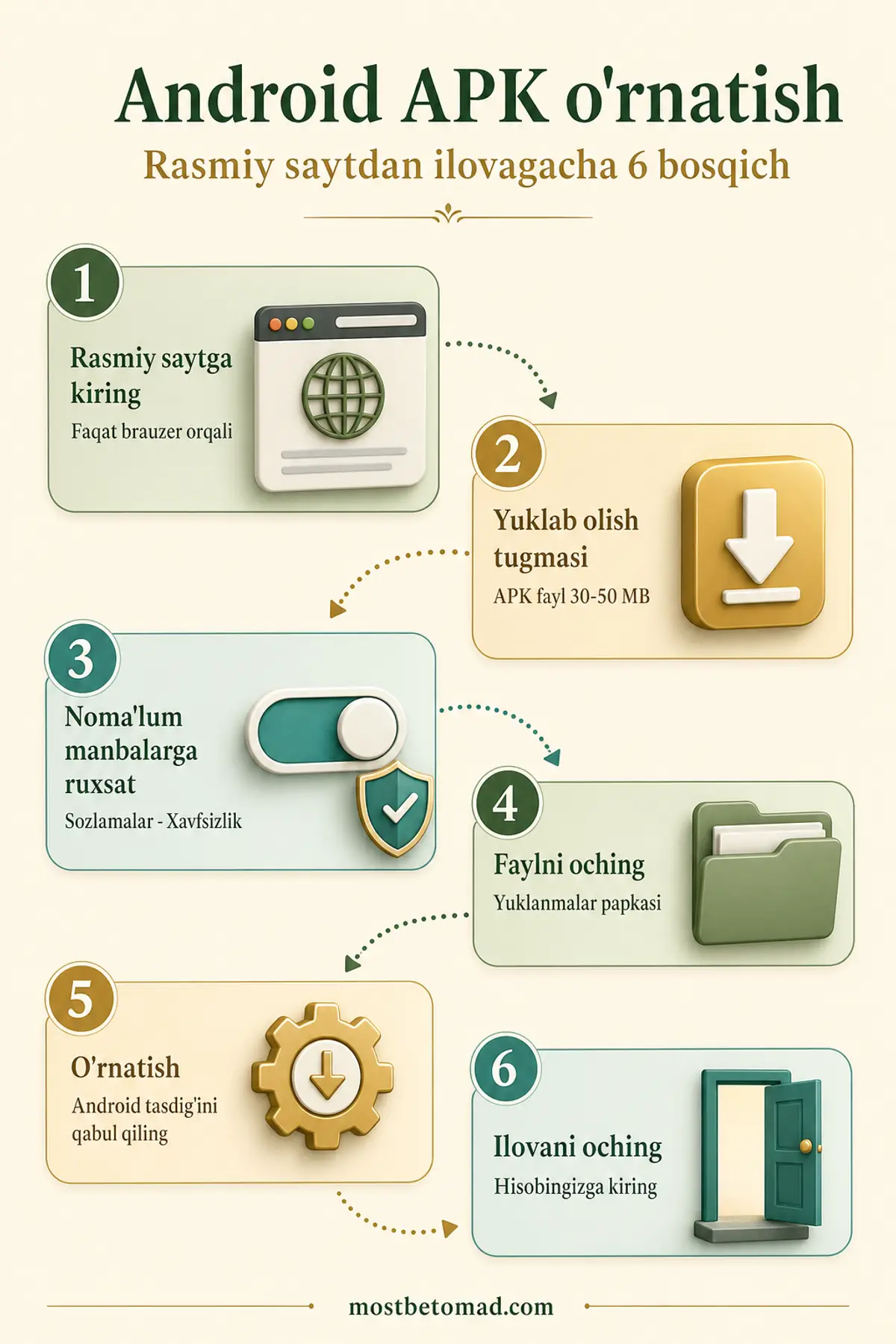
(1) In your browser, open the official Mostbet site and click "Download"; (2) the APK file downloads (about 30-50 MB); (3) if a settings prompt appears, allow "Unknown sources"; (4) open the downloaded file (via Downloads folder or the browser); (5) tap "Install" and accept the Android prompt; (6) launch the app and log in. The full process takes 2-5 minutes.

Android APK installation in 6 steps
Six steps in order; the permission from step 3 is switched off again afterwards.

Is the Mostbet APK safe? How to spot fake files?

The official APK is safe — Mostbet uses TLS encryption and Android app sandboxing. The main risks come from third-party sources: fake APK files can include Trojans, keyloggers or credential stealers. Checks: (1) file size around 30-50 MB (smaller is suspicious); (2) installation permissions — Mostbet requests internet, account and camera (for KYC photo upload), but does not request SMS, contacts, or general file access; (3) verify the SSL certificate — the browser lock icon next to the address bar should be green. How to recognise fake sites: Mostbet safety.

How do I update the Mostbet APK?

App updates do not arrive automatically via Play Store — when the version is outdated, the app shows an "Update available" notice on launch. Download the new APK and install over the old one — data is preserved (account, settings). New versions are usually announced on the site as well. Running an old version may expose you to security bugs (no patches). Recommendation: install updates within 1-3 months.

Mostbet app system requirements

Minimum requirements for the Mostbet APK: Android 5.0 (Lollipop) or higher, 2 GB RAM, 100 MB free storage (after install), Internet (4G or Wi-Fi). Recommended: Android 9+ and 3 GB+ RAM (for smooth live betting or Aviator). Screen size 4 inches or larger (small screens compress the UI). Tablet and phone both work. The app does not run offline — always needs internet.

Common Mostbet APK installation errors

The 5 most common errors: (1) "This file cannot be installed" — enable "Unknown sources"; (2) "App not installed" — uninstall the old version and install fresh (data is not lost if your account is server-side); (3) download stalls — switch browsers on the Mostbet site (try Firefox instead of Chrome); (4) app does not open after installation — restart the phone and try again; (5) push notifications not working — check permissions in app settings and disable battery optimisation.

iOS users and next step

After the app is installed on Android, the standard path is to sign in and make a deposit. The iOS variant and deposit flow are summarised below.

How do I install Mostbet on iOS?

iPhone users install the Mostbet app via App Store by searching "Mostbet". If it's not found in App Store, you may need to change the regional account (Apple ID settings). Full guide: Mostbet iOS.

How do I make the first in-app deposit?

In-app deposit works the same as on the website — from Cashier, select Humo, Uzcard, Click or Payme. Deposit methods and terms: Mostbet deposit.

18+ · Psixologik yordam: 1197 (ichki: 4)